MCP Server
SuperSpace runs a Model Context Protocol (MCP) server so AI assistants can manage your sites, DNS, domains, and more on your behalf. It is a stateless, OAuth-only, JSON-RPC 2.0 endpoint at POST /mcp on your brand host, exposing a curated subset of the REST API as MCP tools — broad read access plus a small set of safe writes.
Connecting a client
Modern MCP clients connect to SuperSpace directly over remote HTTP — no local bridge or config file required. Point your client at the SuperSpace MCP endpoint and authorize in the browser.
Quick start
| Transport | Streamable HTTP (remote) |
| URL | https://control.superspace.nl/mcp |
| Headers / credentials | None — authentication happens after setup via the OAuth browser flow |
There are no headers, tokens, or environment variables to configure up front. After you add the server, your client prompts you to sign in to SuperSpace and authorize access; the token is obtained and stored for you.
Use your own brand host
Replace control.superspace.nl with your SuperSpace brand hostname. White-label brands each have their own host (for example brand.example.com). The /mcp URL must match the brand you authorize against — access tokens are locked to the brand they were issued under (see Authentication below).
Claude (desktop)
Claude supports SuperSpace as a custom connector — no manual configuration needed. See Anthropic's Get started with custom connectors using remote MCP for full details.
- Open Customize → Connectors → Add custom connector.
- Give it a Name (for example,
SuperSpace). - Set the Remote MCP server URL to
https://control.superspace.nl/mcp. - Click Add.
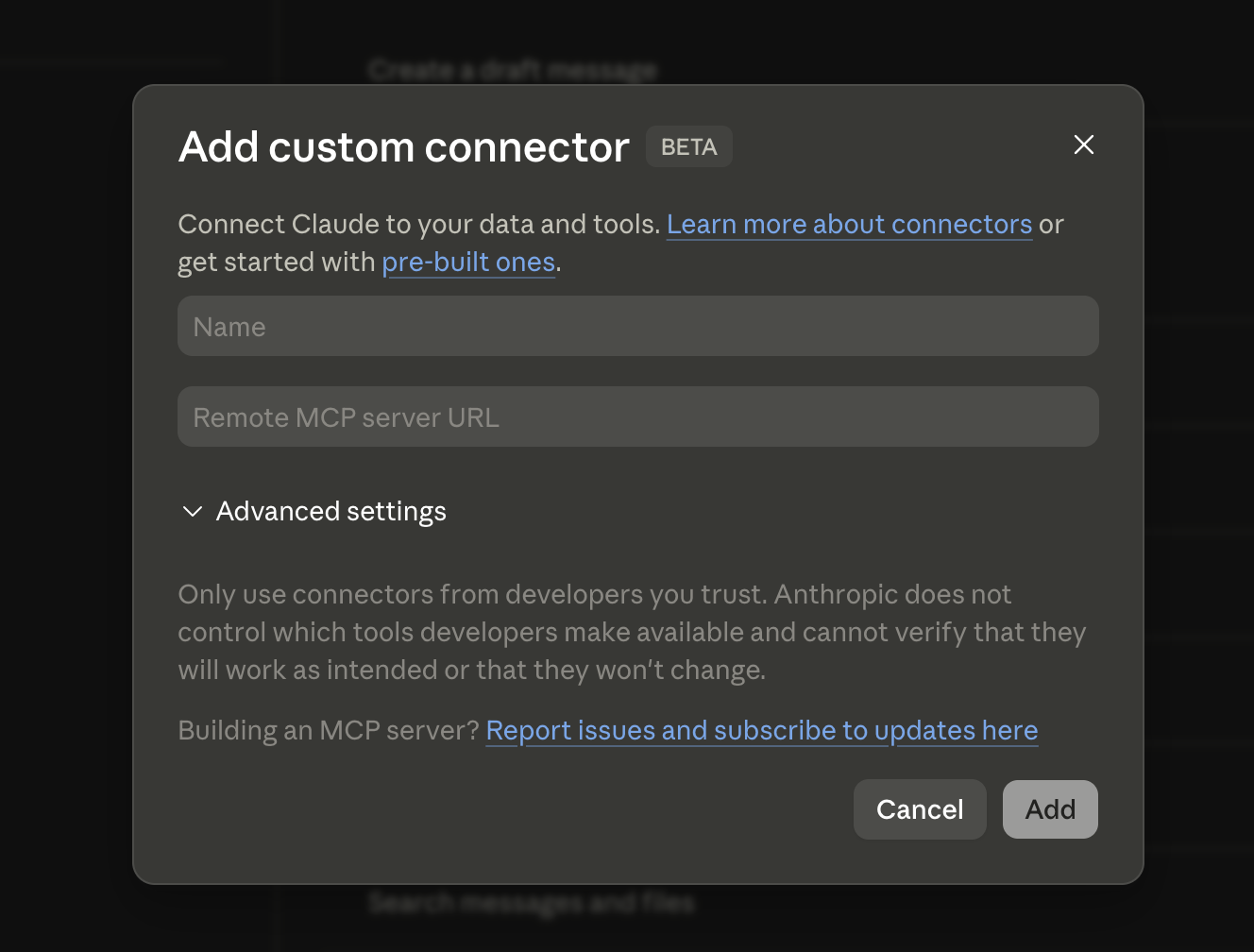
Once added, Claude prompts you to authenticate with your SuperSpace account to complete the connection.
OpenAI Codex (desktop)
- Open Settings → MCP Servers → Add Server.
- Enter the server URL
https://control.superspace.nl/mcp. No additional fields are needed beyond the URL. - Save.
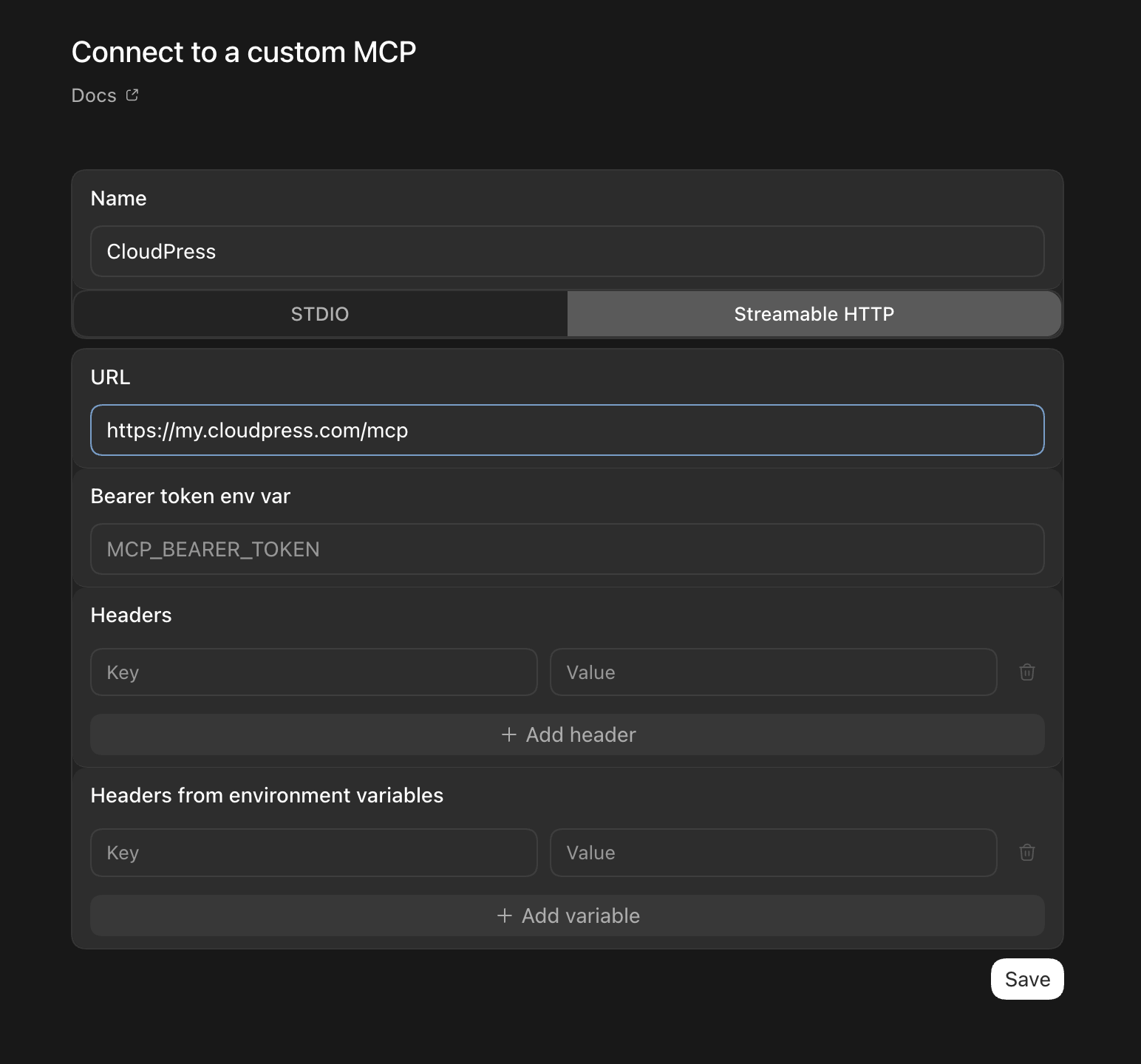
After saving, Codex prompts you to authenticate with your SuperSpace account to complete the connection.
Transport
POST /mcpcarries the JSON-RPC request.GET,PUT,PATCH, andDELETEreturn405 Method Not Allowed.- The request body is a single JSON-RPC object. Batch arrays are rejected (
-32600); malformed JSON returns-32700(parse error). - A notification (a request with no
id, such asnotifications/initialized) returns202with an empty body. - CORS is enabled for
/mcp(origins*, methodsGET/POST/OPTIONS). A browserOrigin, when present, must match the request host or the request is rejected403(Origin not allowed); non-browser clients send noOrigin, which is allowed. - The optional
MCP-Protocol-Versionheader, if sent, must be one of2025-06-18,2025-03-26, or2024-11-05, otherwise400. - Rate limit: 6000 requests / 10 minutes, keyed per OAuth token.
Authentication
The MCP server accepts only OAuth 2.1 access tokens (session and API-key credentials are refused — see OAuth 2.1). Beyond the normal OAuth checks (brand isolation, account membership, trial accounts are blocked), the token must be audience-bound to this MCP resource per RFC 8707: its resource must equal https://<host>/mcp.
A token issued for the REST API (no resource), or for a different brand's /mcp, is rejected with 401:
{ "jsonrpc": "2.0", "id": null, "error": { "code": -32600, "message": "invalid_token: token audience is not valid for this MCP resource" } }
with the header:
WWW-Authenticate: Bearer resource_metadata="https://<host>/.well-known/oauth-protected-resource/mcp"
The audience is fixed when the token is authorized and is inherited across refreshes. (Conversely, an MCP-audience token is rejected at /api — see Authentication.) mcp-remote performs this audience-bound authorization automatically.
Protected-resource metadata (RFC 9728)
GET /.well-known/oauth-protected-resource
GET /.well-known/oauth-protected-resource/mcp
{
  "resource": "https://<host>/mcp",
  "authorization_servers": ["https://<host>"],
  "scopes_supported": ["sites:read","sites:write","domains:read","domains:write","dns:read","dns:write","billing:read"],
  "bearer_methods_supported": ["header"]
}
A client follows authorization_servers to the authorization-server metadata to discover the authorize and token endpoints, then runs the standard PKCE flow.
JSON-RPC methods
| Method | Result |
|---|---|
initialize |
{ "protocolVersion": "2025-06-18", "capabilities": { "tools": { "listChanged": false } }, "serverInfo": { "name": "cloudpress-mcp", "version": "1" } } (echoes a supported requested version) |
ping |
{} |
tools/list |
{ "tools": [ ... ] } — filtered to the tools the token's scopes allow |
tools/call |
Executes a tool (see result shape) |
notifications/* |
Acknowledged, no response (202) |
| anything else | -32601 Method not found |
JSON-RPC error codes: -32700 parse error · -32600 invalid request / batch / origin / version / auth · -32601 method not found · -32602 invalid params (unknown tool, insufficient_scope with data.required_scope, missing request_id) · -32603 internal error.
Scopes and tool visibility
Each tool requires an OAuth scope from the same vocabulary as the REST API. tools/list returns only the tools your token's scopes cover. Calling a tool you lack scope for returns a JSON-RPC error inside a 200 response (not an HTTP 403):
{ "jsonrpc": "2.0", "id": 1, "error": { "code": -32602, "message": "insufficient_scope", "data": { "required_scope": "sites:write" } } }
Idempotency
Every write tool requires an arguments.request_id (an idempotency key); omitting it returns -32602 (request_id is required for this tool). Calls are de-duplicated per token, tool, and request_id, with a fingerprint of the remaining arguments:
- Replaying a completed call returns the original stored result (no re-execution).
- The same
request_idstill in flight returns a success result withstructuredContent.status="processing". - The same
request_idwith different arguments returns an error result (isError: true) — use a freshrequest_id.
Keys are retained for about 24 hours. A few create tools are explicitly non-idempotent because the underlying POST creates a fresh record (a reclaim could duplicate it): create_dns_zone, create_edge_rule, create_waf_custom_rule, create_rate_limit, create_access_list, and activate_shield. Avoid blind retries on those — to change an existing record, use the matching update_* tool. Each tool advertises its behavior in tools/list via annotations (readOnlyHint, destructiveHint, idempotentHint, openWorldHint).
Tool results
A successful tools/call returns both a text block and structured data (the same payload, rendered from the REST API templates so shapes match the documented responses):
{ "content": [ { "type": "text", "text": "<JSON string>" } ], "structuredContent": { }, "isError": false }
Business failures are not JSON-RPC errors — they come back as a normal result with "isError": true and a text message. Secret redaction is applied to both emits: get_site includes site.ssh only if the token also holds sites:write, and get_order always strips SSH data.
Tool catalog
65 tools, all scoped to the authorized account. Reads are broad; writes cover DNS records/zones, site rename and restart, CDN caching and cache purge, edge rules, and the full Shield surface (activate/deactivate, WAF settings and managed/custom rules, rate limits, access lists, bot detection). Below, * marks a required argument and ✎ marks a write tool (which requires a request_id).
Sites
| Tool | Scope | Arguments | Notes |
|---|---|---|---|
list_sites |
sites:read |
— | Active sites |
get_site |
sites:read |
id* |
Includes SSH credentials only if the token also has sites:write |
rename_site ✎ |
sites:write |
id*, name*, request_id* |
Name only (no plan change) |
restart_site ✎ |
sites:write |
id*, request_id* |
Async container restart |
DNS
| Tool | Scope | Arguments |
|---|---|---|
list_dns_zones |
dns:read |
page, per_page |
get_dns_zone |
dns:read |
id* |
create_dns_zone ✎ |
dns:write |
name*, request_id* |
delete_dns_zone ✎ |
dns:write |
id*, request_id* |
get_dns_metrics |
dns:read |
id*, date_from, date_to |
list_dns_records |
dns:read |
dns_zone_id*, page, per_page |
get_dns_record |
dns:read |
dns_zone_id*, id* |
create_dns_record ✎ |
dns:write |
dns_zone_id*, record_type* (integer code), value*, request_id*, plus ttl, name, priority, weight, port, flags, record_tag, comment |
update_dns_record ✎ |
dns:write |
dns_zone_id*, id*, request_id*, plus ttl, value, priority, weight, port, flags, record_tag, comment |
delete_dns_record ✎ |
dns:write |
dns_zone_id*, id*, request_id* |
Domains and registration
| Tool | Scope | Arguments | Notes |
|---|---|---|---|
list_domains |
domains:read |
page, per_page |
Site hostnames |
get_domain |
domains:read |
id* |
|
list_domain_registrations |
domains:read |
q |
|
get_domain_registration |
domains:read |
id* |
|
list_domain_contacts |
domains:read |
q |
|
get_domain_contact |
domains:read |
id* |
id is an integer, not a GUID |
check_domain_availability |
domains:read |
domain* |
Availability and pricing |
search_domains |
domains:read |
base_name* |
Multi-TLD search |
suggest_domains |
domains:read |
domain* |
Registrar suggestions |
Registrar writes (register/transfer, contact CRUD, glue hosts) are not exposed as tools — use the REST API.
CDN, cache, logs, and metrics
Site-scoped. Reads use sites:read; writes use sites:write. CDN reads and writes need a provisioned pull zone (otherwise cdn_not_active).
| Tool | Scope | Arguments | Notes |
|---|---|---|---|
get_cdn_status |
sites:read |
id* |
Pull-zone status overview |
get_cdn_caching |
sites:read |
id* |
Caching settings (smart cache, expirations, vary toggles, stale-while-*) |
get_cache_status |
sites:read |
id* |
Cache-layer status (redis/nginx/bunny) |
get_cdn_metrics |
sites:read |
id*, period or period_start, step |
|
get_cdn_logs |
sites:read |
id*, plus filters (from, to, period, status, cache_status, country, url_contains, limit, offset, order) |
Window of 3 days max |
get_cdn_logs_summary |
sites:read |
Same filters | Aggregated |
get_origin_logs |
sites:read |
id*, date (MM-DD-YYYY) |
|
get_resource_metrics |
sites:read |
id*, kind[], period_start, period_end, step |
No range returns a current snapshot |
update_cdn_caching ✎ |
sites:write |
id*, request_id*, plus any caching field |
Merge — sends only the keys you pass; returns the refreshed config |
purge_cdn_cache ✎ |
sites:write |
id*, request_id* |
Purges the entire pull-zone cache |
Edge rules
Site-scoped, CDN active. Reads use sites:read; writes use sites:write. System (CPRESS -) rules are hidden and cannot be created, updated, deleted, or toggled.
| Tool | Scope | Arguments | Notes |
|---|---|---|---|
list_edge_rules |
sites:read |
id* |
Returns each rule's Bunny Guid and readable labels |
create_edge_rule ✎ |
sites:write |
id*, request_id*, ActionType*, plus ActionParameter1/2/3, TriggerMatchingType, Triggers, ExtraActions, Description, Enabled, OrderIndex |
Non-idempotent (creates a fresh rule). Bunny PascalCase shape |
update_edge_rule ✎ |
sites:write |
id*, guid*, request_id*, plus any create field |
Merge (send only what changes) — an MCP convenience; the REST update is a full replace |
delete_edge_rule ✎ |
sites:write |
id*, guid*, request_id* |
Requires the destroy role |
toggle_edge_rule ✎ |
sites:write |
id*, guid*, enabled*, request_id* |
Enable or disable |
Shield
Site-scoped. Reads use sites:read; writes use sites:write. Plan-gated (shield_not_in_plan); reads and writes need a provisioned shield zone (shield_not_active).
| Tool | Scope | Arguments | Notes |
|---|---|---|---|
get_shield_status |
sites:read |
id* |
Config summary (no engine-config) |
get_waf_config |
sites:read |
id* |
Full WAF config incl. engine-config (paranoia levels and protocol allow-lists) |
list_waf_managed_rules |
sites:read |
id* |
Managed-rule catalogue (rule ids for update_shield) |
list_waf_custom_rules |
sites:read |
id* |
Custom rules and their ids |
list_rate_limits |
sites:read |
id* |
Rate-limit rules and their ids |
list_access_lists |
sites:read |
id* |
Custom allow/block lists and their ids |
list_curated_access_lists |
sites:read |
id* |
Curated Bunny threat lists (no REST equivalent) |
get_shield_events |
sites:read |
id*, date, continue |
Event log |
get_shield_metrics |
sites:read |
id*, view (individual or overview) |
Not plan-gated |
activate_shield ✎ |
sites:write |
id*, request_id* |
Non-idempotent; cdn_not_active if no pull zone |
deactivate_shield ✎ |
sites:write |
id*, request_id* |
Requires the destroy role; soft (disables WAF and DDoS) |
update_shield ✎ |
sites:write |
id*, request_id*, plus WAF / sensitivity / protocol / DDoS / plan_type / learning_mode / whitelabel_response_pages fields |
Merge (all fields optional) |
update_bot_detection ✎ |
sites:write |
id*, request_id*, plus execution_mode / sensitivity / fingerprint fields |
Premium-only; merge |
create_waf_custom_rule ✎ |
sites:write |
id*, request_id*, rule_name*, action_type*, variable_type*, operator_type*, severity_type*, value*, plus variable_subselector, rule_description |
Premium-only, non-idempotent |
update_waf_custom_rule ✎ |
sites:write |
id*, rule_id*, request_id*, plus the same rule fields |
Full replace; not premium-gated |
delete_waf_custom_rule ✎ |
sites:write |
id*, rule_id*, request_id* |
Requires the destroy role |
create_rate_limit ✎ |
sites:write |
id*, request_id*, rule_name*, action_type*, match_variable*, operator_type*, severity_type*, value*, request_count*, timeframe*, plus block_time, counter_key_type, rule_description |
Non-idempotent. rule_name and rule_description: letters, numbers, and spaces only |
update_rate_limit ✎ |
sites:write |
id*, rule_id*, request_id*, plus the same fields |
Full replace |
delete_rate_limit ✎ |
sites:write |
id*, rule_id*, request_id* |
Requires the destroy role |
create_access_list ✎ |
sites:write |
id*, request_id*, name*, type*, content*, plus description, checksum, action (allow/block) |
Non-idempotent; also sets the list action |
update_access_list ✎ |
sites:write |
id*, list_id*, request_id*, plus name, content, checksum, action |
Content full-replace |
delete_access_list ✎ |
sites:write |
id*, list_id*, request_id* |
Requires the destroy role |
update_curated_access_list ✎ |
sites:write |
id*, configuration_id*, request_id*, plus is_enabled, action (integer) |
Curated list enable/action (no REST equivalent; sellable plans only) |
Orders and subscriptions
Read-only, scope billing:read.
| Tool | Arguments | Notes |
|---|---|---|
list_orders |
page, per_page |
|
get_order |
id* |
SSH data is always stripped |
list_subscriptions |
page, per_page |
|
get_subscription |
id* |
Not available as tools
Site create/delete/resize, backups and restores, SSO, users/roles/accounts/API keys, carts and order writes (including domain orders), registrar/contact/glue-host writes, site-domain and certificate writes, tasks, and all billing writes are intentionally not exposed via MCP. Use the REST API for those — with a session or API-key credential where the operation is OAuth-blocked.
Advanced: manual installation (stdio bridge)
Only needed for older clients without remote MCP support
Most clients now connect directly over remote HTTP (see Connecting a client above). Use the bridge below only with an older client that speaks stdio and cannot talk to the remote /mcp endpoint directly.
The mcp-remote bridge runs locally over stdio and proxies to SuperSpace, handling the OAuth login for you (it opens a browser to authorize, then caches the token).
Edit your client's MCP configuration file (for example, claude_desktop_config.json) and add SuperSpace under the mcpServers object:
"superspace": {
  "command": "npx",
  "args": [
    "-y",
    "mcp-remote",
    "https://control.superspace.nl/mcp"
  ]
}
If npx is not on the client's PATH — common, since GUI apps don't inherit your shell environment — and you have mise installed, use it to provide npx:
"superspace": {
  "command": "mise",
  "args": [
    "x",
    "--",
    "npx",
    "-y",
    "mcp-remote",
    "https://control.superspace.nl/mcp"
  ]
}
Then fully restart the client. The first time it connects, a browser window opens for you to authorize via SuperSpace OAuth; approve the account and the connection completes.